In short. Setting up a domain takes four steps. Delegate it: set nameservers at your registrar pointing to whoever hosts the DNS zone. Fill that zone with an A record or CNAME for your site. Describe the domain on the web server with a virtual host and certificate. Add MX and SPF records for email. Verify each step separately.
One disambiguation before we start. If you were looking for a domain controller or a Windows domain network, that is Active Directory — a directory service that manages accounts inside a company's local network. It has nothing to do with internet domain names. This article is about public domains such as example.com: DNS, hosting and mail.
What happens after you buy a domain
Registering a domain and configuring it are two different jobs. Once payment clears, the registrar creates a record in the top-level domain registry: the name is yours, but it points nowhere. The site will not open, mail will not flow, and ping will report that the host is unknown. The domain starts working only after you walk the full chain.
The layers are independent and they break independently — that is the single most useful thing to understand before opening any control panel:
- Delegation. The registry learns which nameservers are authoritative for your domain. Configured at the registrar where the domain was bought.
- The DNS zone. Those nameservers hold the records: the site address, the mail route, the subdomains. Configured wherever you delegated the domain to.
- The web server. The server has to know that this domain belongs to it and serve the right site and the right certificate for it.
- The mail service. MX records route incoming mail; SPF, DKIM and DMARC prove that outgoing mail from your domain is genuine.
The order matters. Until the domain is delegated, any A or MX records are dead weight — nobody will ever ask for them.
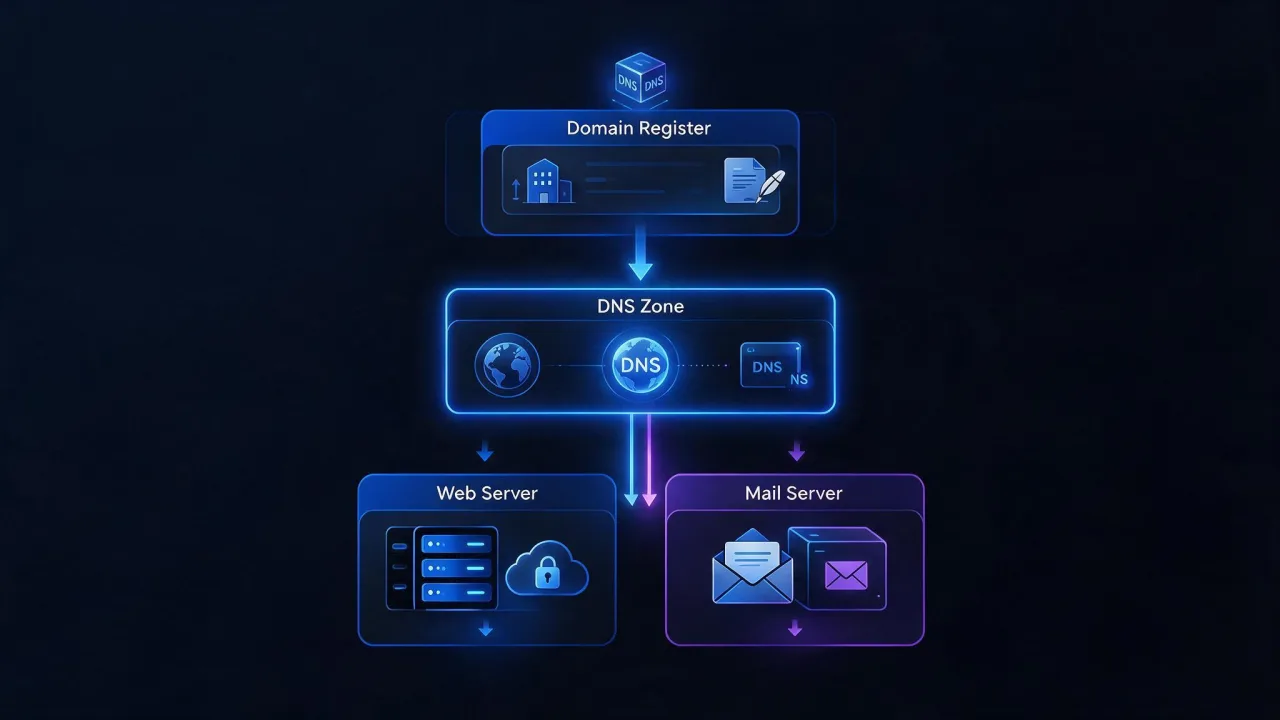
How to set up a domain name: delegation and nameservers
Delegation answers the question of who is allowed to speak for the domain at all. In the registrar's panel you list two or more nameservers, and the registrar publishes them into the top-level domain registry. From that moment any resolver in the world that asks the root servers about your domain is sent to them.
The nameserver hostnames come from whoever will host the zone. Usually that is the hosting provider that runs your site, but not necessarily — the zone can live at the registrar, at the host, at a standalone DNS provider or on your own server. They look like ns1.provider.example and ns2.provider.example.
How NS differs from an A record
This is the most common confusion, and it routinely costs days of downtime. The distinction is simple:
- NS answers "who stores this domain's records". It lives in the parent zone at the registry and is mirrored inside the zone itself.
- A answers "what IP address does this name have". It lives inside the zone — on the very servers listed in NS.
The practical consequence: if you carefully entered an A record in the registrar's panel while the domain's NS records point at your host, your A record does nothing. Nobody reads it. Records must be edited where the domain is delegated to, not where it was purchased. If those happen to be the same place, good — but verify anyway.
Rule: find out where the domain is delegated first, then look for the place to edit records. Registrar panels often keep showing an inactive zone editor. It looks functional and has no effect on resolvers whatsoever.
Glue records: when the nameservers live inside their own domain
A special case arises when a domain's nameservers are named as its own subdomains: ns1.example.com serving example.com. That is circular — to learn the address of ns1.example.com you would have to ask ns1.example.com. Glue records break the loop: the registrar publishes those addresses directly into the parent zone. They are registered as a separate step at the registrar, usually called private nameservers or host records. If you use someone else's nameservers in someone else's domain, you do not need glue.
How to verify delegation
# what the parent zone actually hands out
dig +trace example.com | tail -n 20

# short answer: the domain's nameservers
dig +short NS example.com

# what the registry and registrar think about delegation
whois example.com

# ask a public resolver directly
dig NS example.com @1.1.1.1 +short
If dig +short NS returns nothing or shows the old servers, delegation has not applied yet or was never saved. To see who a domain is delegated to and when it expires, use the WHOIS lookup — it also shows registration dates and any status codes that suspend the domain.
The hosting-attachment step specifically is covered in its own walkthrough: connecting a domain to hosting. Here we carry on down the chain.
How to point a domain to a website: A record, CNAME, www and non-www
Once the domain is delegated, you fill the zone. The minimum for a website is one record for the apex and one for www. Below is a reference for the record types you will meet along the way.
| Type | What it defines | Example value | Limits and gotchas |
|---|---|---|---|
| NS | Nameservers authoritative for the zone | ns1.provider.example | Edited at the registrar; the TTL in the parent zone is set by the registry, not by you |
| A | IPv4 address of a name | 203.0.113.10 | An address only — no port, no path |
| AAAA | IPv6 address of a name | 2001:db8::10 | Add it only if the server actually listens on IPv6 |
| CNAME | Alias: one name refers to another name | example.com. | Cannot coexist with other records on the same name, so it cannot sit on the apex |
| MX | Where to deliver the domain's mail | 10 mx1.mailhost.example. | The value is a hostname, not an IP, and it must not be a CNAME |
| TXT | Free-form text: SPF, DKIM, DMARC, ownership proofs | v=spf1 include:_spf.mailhost.example -all | A domain must publish exactly one SPF record |
| CAA | Which certificate authorities may issue for the name | 0 issue "letsencrypt.org" | A wrong value will block certificate issuance |
A record or CNAME
The choice follows from what your host gave you. If they handed you an IP address, use an A record. If they handed you a name such as site-123.platform.example, use a CNAME. Do not mix the two: a CNAME to a name whose address changes exists precisely so that you never have to rewrite an A record when the platform moves things around.
A CNAME cannot sit on the apex — the bare
example.com. The standard forbids a CNAME from coexisting with any other record on the same name, and the apex always carries NS and SOA. Some DNS providers offer non-standard workarounds branded ALIAS, ANAME or CNAME flattening; they solve it on their side, but such a record has to be rebuilt if you ever move providers. See RFC 1034 and RFC 2181.
www and non-www: pick one
Technically example.com and www.example.com are two different names, and both must resolve. Only one of them should open for the visitor, though; the other returns a permanent redirect. Which one you make canonical is a matter of taste — what matters is that the choice is singular and stays put.
# canonical without www
example.com.        3600  IN  A      203.0.113.10
example.com.        3600  IN  AAAA   2001:db8::10
www.example.com.    3600  IN  CNAME  example.com.

# canonical with www, when a platform serves the apex
example.com.        3600  IN  A      203.0.113.10
www.example.com.    3600  IN  A      203.0.113.10
The redirect itself is not a DNS matter — DNS only maps names to addresses, so the rule belongs on the web server. To confirm the resulting hop chain is short and never drops back to plain http, run a redirect check. A full walkthrough of record types and their values lives in the DNS records guide.
How to set up a domain on a server and point it to an IP
Pointing a domain at an IP is exactly the A record from the previous section. But the record alone is not enough: the server behind that address has to recognise the domain as its own. Otherwise you land on the default site — someone else's or an empty one.
A web server dispatches incoming requests by the Host header. If no virtual host matches that value, the first or default one answers instead — hence the classic "I pointed the domain and somebody else's site opens".

nginx
server {
    listen 80;
    listen [::]:80;
    server_name example.com www.example.com;
    return 301 https://example.com$request_uri;
}

server {
    listen 443 ssl;
    listen [::]:443 ssl;
    server_name example.com;
    root /var/www/example.com/public;

    ssl_certificate     /etc/letsencrypt/live/example.com/fullchain.pem;
    ssl_certificate_key /etc/letsencrypt/live/example.com/privkey.pem;
}

server {
    listen 443 ssl;
    server_name www.example.com;
    ssl_certificate     /etc/letsencrypt/live/example.com/fullchain.pem;
    ssl_certificate_key /etc/letsencrypt/live/example.com/privkey.pem;
    return 301 https://example.com$request_uri;
}
After editing, validate and reload without dropping connections: nginx -t && nginx -s reload. The matching rules are documented in the nginx server names reference.
Apache
<VirtualHost *:443>
    ServerName example.com
    ServerAlias www.example.com
    DocumentRoot /var/www/example.com/public

    SSLEngine on
    SSLCertificateFile    /etc/letsencrypt/live/example.com/fullchain.pem
    SSLCertificateKeyFile /etc/letsencrypt/live/example.com/privkey.pem
</VirtualHost>
Validate with apachectl configtest and apply with apachectl graceful.
The certificate comes after DNS, not before
Automated issuance over an HTTP challenge requires the domain to already point at that server: the certificate authority resolves the name itself and has to reach you. So the order is fixed — A record and a port 80 virtual host first, then issuance, then HTTPS and the redirect. If you publish a CAA record, make sure the authority you use is allowed in it, or issuance will be refused.
Never migrate a site in one move: the domain, the zone and the server switch at different moments. Do not change the A record until the new server answers correctly for the domain name. You can test the server before touching DNS by supplying the header by hand:
curl -sI -H 'Host: example.com' http://203.0.113.10/
How to set up email on your domain: MX, SPF and signatures
Domain email is a branch of configuration separate from the website. It does not depend on where the site is hosted — the mail service can sit with one provider and the site with another. The only thing tying them together is a set of records in one DNS zone.
The minimum has four parts:
- MX — where incoming mail is delivered. The value is a hostname plus a preference number: lower means higher priority.
- SPF — a TXT record on the apex listing who is allowed to send mail on your behalf.
- DKIM — a TXT record holding a public key at a name such as
selector._domainkey.example.com. The key and the selector come from the mail service. - DMARC — a TXT record at
_dmarc.example.comthat sets the policy for mail failing the checks and the address for reports.
example.com.                   3600 IN MX  10 mx1.mailhost.example.
example.com.                   3600 IN MX  20 mx2.mailhost.example.
example.com.                   3600 IN TXT "v=spf1 include:_spf.mailhost.example -all"
sel1._domainkey.example.com.   3600 IN TXT "v=DKIM1; k=rsa; p=MIIBIjANBg..."
_dmarc.example.com.            3600 IN TXT "v=DMARC1; p=none; rua=mailto:dmarc@example.com"
Two mistakes break delivery the quietest. First, more than one SPF record on a domain — under RFC 7208 that is a permanent error and the check fails outright, so everything must be merged into a single string. Second, an MX pointing at a CNAME — RFC 2181 requires an MX target to be a name that owns an address record.
If a domain is not meant to carry mail at all, say so explicitly with a null MX per RFC 7505: example.com. IN MX 0 . Senders then learn immediately that there is nowhere to deliver, instead of queueing and retrying.

MX syntax, preference values and backup servers are unpacked separately in the MX records and email setup guide. To confirm the records are published and mutually consistent, run the domain email records check; for the raw list of mail hosts use the MX lookup.
How long domain changes take to apply, and why
There is no exact figure, and anyone quoting one in hours is guessing. The speed is governed not by "the internet updating" but by three things: the TTL on the old records, the behaviour of individual resolvers, and caches on your own side.
TTL is the number of seconds a resolver is permitted to keep an answer. Until it expires, the resolver serves from cache and ignores your change entirely. That is why TTL has to be lowered ahead of time — earlier than its own current value, not at the moment of the move.
# current TTL of a record (second field of the answer)
dig +noall +answer example.com A

# the delegating NS TTL in the parent zone is usually much larger
# The parent-zone server differs per TLD: a.gtld-servers.net for .com
# and .net, a.dns.ripn.net for .ru. Ask the wrong one and you get the
# root servers back instead of your domain's NS records.
dig +noall +authority example.com NS @a.gtld-servers.net

# ask an authoritative server directly: no cache there,
# so you see the result as soon as the zone is saved
dig A example.com @ns1.provider.example +short
Hence the practical migration order: a day or more before the work, lower the TTL of the records involved; wait out the old value; switch the records; confirm the authoritative servers return the new data; only then restore the TTL to its normal value.
Changing nameservers propagates more slowly than changing an A record. The TTL of the delegating records in the parent zone is set by the top-level domain registry, not by you, and it is normally substantially larger than anything inside your zone. When planning a move, separate the two actions in time: bring the zone up on the new nameservers with identical values first, and change delegation only after that.
A separate class of delay is caching your DNS provider cannot reach: the ISP resolver, the operating system cache, the browser cache. Negative answers are cached too — if you visited the domain before it started working, the "no such name" response sits in cache for the interval defined in the zone's SOA record (RFC 2308). So "it does not open for me but it opens for my colleague" is a normal intermediate state, not evidence of a mistake.
# flush the DNS cache on your own machine
resolvectl flush-caches          # Linux with systemd-resolved
sudo dscacheutil -flushcache     # macOS
ipconfig /flushdns               # Windows

# check what your OS sees, as opposed to your browser
getent hosts example.com
How to set up a domain correctly: common mistakes
The site does not open at all
Walk the layers top down and stop at the first one that stays silent. No NS in the answer means the domain is not delegated or the change was never saved at the registrar. NS present but no A record means you are editing a zone the domain is not delegated to. A record present and correct but the connection never establishes means the problem is the server or the firewall — DNS did its job. It is also worth checking that the domain is not suspended: an expired registration or unverified registrant details strip delegation entirely, and it looks exactly like a configuration error.
The old site is still showing
Almost always this is cache rather than a bad record. Check in order: what the authoritative server returns (the truth is visible there immediately), what a public resolver returns, what your operating system sees. If the authoritative server returns the new address and you still see the old one, wait out the TTL and flush the local cache. If everyone sees the new address but the content is stale, the problem has moved out of DNS and into the site's own cache or the CDN.
A second scenario: the address is new but a stranger's site opens. That means the request reached the server and there is no virtual host for your domain on it — go back to the section on server_name and ServerName.
Email does not arrive
Check first that MX records are published at all and point to names that own address records. Then check that the mailboxes exist on the service side: DNS can be flawless, but if the mailbox was never created the receiving server will reject anyway. Next comes SPF — one record, no typos in the include mechanism, a deliberate final rule. If mail leaves but lands in spam, stop looking at MX and look at DKIM and DMARC: the signature has to be published under the selector the sending server actually uses.
Small things that cost hours
- The trailing dot. In classic zone-file syntax
example.com.with a dot is a fully qualified name, whileexample.comwithout one is relative and gets the zone name appended. Web panels have their own conventions, so verify the result with a query rather than by eye. - Stray spaces and line breaks inside long DKIM TXT values.
- The apex written as
@versus an empty name field — panels differ, and getting it wrong produces a record on the name@.example.com. - A forgotten AAAA record still pointing at the old server: IPv6-capable browsers follow it and see the old site, while you on IPv4 see the new one.

How to check your domain setup
Check every layer separately, and preferably from outside — from your own machine you see your own resolver's answer, not the whole picture.
- WHOIS — who owns the domain, how long it is paid for, which nameservers the registry lists, and whether any status codes are suspending it.
- DNS record lookup — what is actually published in the zone: A, AAAA, CNAME, MX, TXT, NS and their TTLs.
- DNS propagation check — what resolvers in different locations currently see. This is the report that answers "has it applied yet".
- Email records check — MX, SPF, DKIM and DMARC together, with the contradictions between them called out.
- SSL certificate check — whether the certificate covers both names, with and without www, and when it expires.
- HTTP header check — what the server returns for the domain name and where the redirects lead.
Once the setup is finished, the domain is worth putting under continuous monitoring: registration expiry, certificate expiry and site availability are three things that fail silently and are usually discovered by customers first.
Frequently asked questions
How is setting up a domain different from setting up a domain controller?
They are unrelated technologies sharing a word. A domain controller and a domain network belong to Active Directory — the directory service that manages accounts and permissions inside an organisation's local network. Setting up a domain name is about DNS and the public internet. The only overlap is the term "domain".
Can the domain live with one provider, the site with a second and the mail with a third?
Yes, and it is a common arrangement. The domain is registered with a registrar, the zone is delegated wherever you prefer to manage it, the A record points at the web server and MX points at the mail service. The three parts are joined only by records in a single zone and can be changed independently.
Do I need to configure www if the site works without it?
Technically no, but you should. Some users and mail clients prepend www automatically, and without a record they get a resolution error. The right approach is to publish a record for www and set a permanent redirect to whichever variant you made canonical.
Why does the domain open for me but not for my client?
Different resolvers hold different caches and expire them at different moments. Until the old record's TTL runs out on the client's resolver, it keeps serving the old answer. Compare what the zone's authoritative server returns against what public resolvers see — a mismatch confirms it is caching, and the wait is bounded by the original TTL.
What if the domain is bought but there is no zone control panel anywhere?
Then the domain is delegated to nameservers you have no account with, or it is not delegated at all. Look up the current NS records via WHOIS and pick one of two routes: get access to those servers, or change the NS records at the registrar to a provider where you are willing to run the zone. After an NS change the zone has to be filled in from scratch — records do not travel with delegation.
How do I transfer a domain to another registrar without breaking the site?
Transferring the registration and moving the zone are separate operations, and they should not happen at once. Make sure the zone already lives where it will stay after the transfer, let it run stably, and only then move the registration. The sequence and the preparation work are covered in the domain transfer checklist.
Domain setup checklist
- Domain registered, registrant details verified, renewal date known.
- Nameservers set at the registrar and matching what the parent zone actually returns.
- Records are edited on the servers the domain is genuinely delegated to.
- An A record (and AAAA if IPv6 is in use) points at the current server address.
- The
wwwname resolves, and one variant permanently redirects to the other. - The web server has a virtual host covering both names of the domain.
- The certificate covers both names, HTTPS is on, and http redirects to it.
- Any CAA record permits the certificate authority you actually use.
- MX records point to names with address records — not to CNAMEs and not to IPs.
- Exactly one SPF record, DKIM published under a working selector, DMARC in place.
- Leftover records from the previous host removed, especially stale AAAA and extra A entries.
- TTL restored to its normal value after the migration.
- Domain expiry, certificate expiry and availability are monitored.