In short. A CDN is a network of intermediary servers in many cities. They hold copies of your site's files and serve them from the node nearest the visitor, without touching your server. That shortens the request path and offloads your hosting. A CDN speeds up static assets: images, stylesheets, scripts, fonts, video. It does not fix slow code or database queries.
There is a lot of marketing around CDNs and very little detail: "make your site several times faster", "global network of nodes". What follows skips the promises: how delivery actually works, which resources genuinely get faster and which do not, where the nodes physically sit, and how to check in five minutes whether your site already runs behind a CDN.

What a CDN is in plain terms
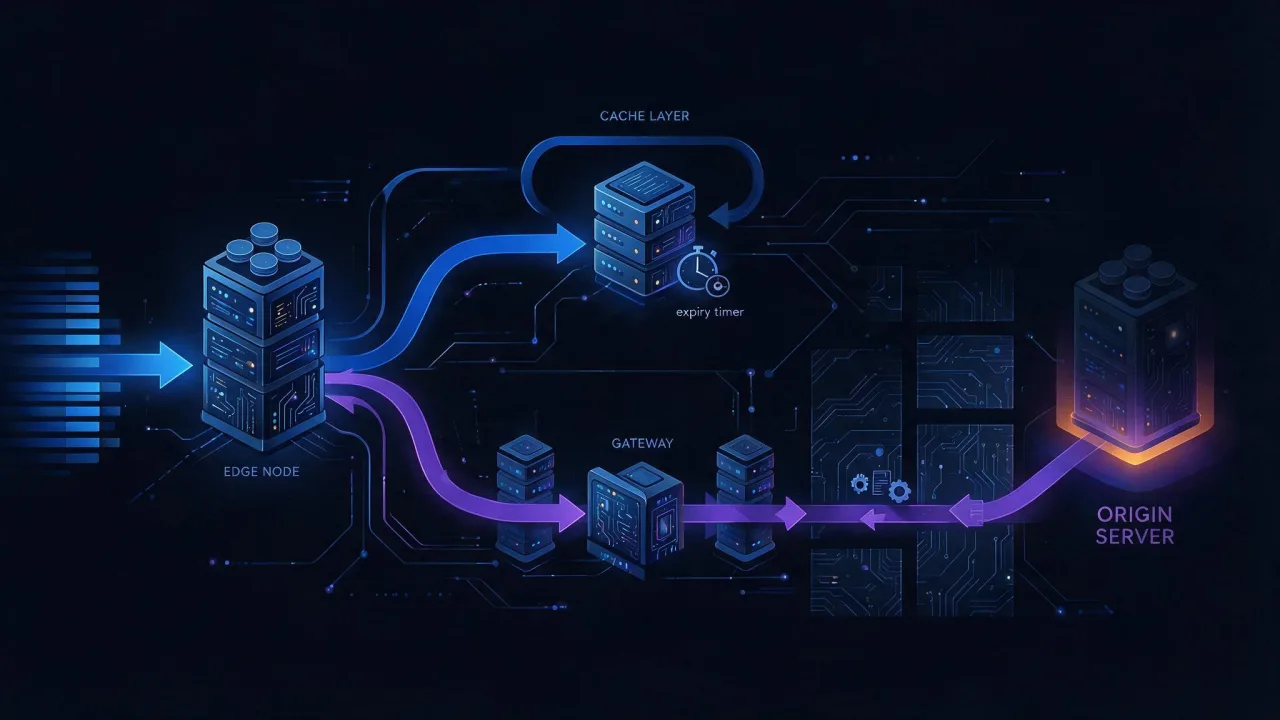
A CDN (Content Delivery Network) is a distributed cache sitting between the visitor and your server. Instead of every request for a logo, stylesheet or video crossing half a continent to your hosting, it lands on the nearest node in the network, where a copy of the file is already waiting.
Three words get mixed up constantly, so let us separate them first.
- Origin — your actual site: hosting, VPS, cloud. Code, database and the master copies of files live here.
- Edge node, also called a PoP (Point of Presence) — a CDN server in a specific city. It receives the visitor's request and either serves a cached copy or fetches it from the origin.
- CDN — the whole network of those nodes, plus the routing and caching logic.
The phrase "CDN server" is technically wrong: a CDN server does not exist in the singular. The entire point of the network is having many points of presence. A single caching intermediary next to your origin is a reverse proxy (nginx, Varnish), not a CDN. The difference is not the software but the geography: a CDN sells you presence in cities where you would never rack your own hardware.
"CDN service" is closer to reality — you are buying delivery, not machines. You do not manage the nodes, you do not choose which disk holds a copy, and you do not know how many machines serve your traffic at a given location.
A CDN does not replace hosting. The origin stays mandatory: it generates HTML, processes forms and stores the master files. If the origin goes down, the CDN serves cached content for a while and then starts returning errors.
How a CDN works: origin, edge node, cache and TTL
The mechanics fit into four steps. Let us walk through them with the file /assets/app.css.
Step 1. The request lands on the nearest node
The browser resolves the domain and gets the address of a CDN node rather than your server. How the nearest node is chosen depends on the provider. Two main approaches:
- DNS-based routing. The CDN's DNS servers answer with different addresses depending on where the query came from. Simple, but it keys on the location of the resolver rather than the user: a corporate DNS server in another city sends the visitor to the wrong node.
- Anycast. The same IP address is announced over BGP from dozens of locations, and routing delivers the packet to the topologically nearest one. Covered in detail in the breakdown of how Anycast works.
Step 2. The node checks its cache: HIT or MISS
The node looks for a fresh copy. The cache key is usually built from the scheme, host, path and some of the query parameters. Two outcomes:
- HIT — a copy exists and has not expired. The file goes straight to the visitor and the origin never hears about the request.
- MISS — no copy, or it has expired. The node fetches from the origin, serves the visitor and keeps a copy.
Step 3. The origin sets the rules through headers
How long a copy lives is decided by your server, not the CDN, through the Cache-Control header. This is the key point: configuring a CDN comes down mostly to getting the origin headers right. The directives that matter:
| Directive | What it does | Where to use it |
|---|---|---|
public | Allows shared caches, including the CDN, to store the response | Static assets served to everyone |
max-age=N | Lifetime in seconds for all caches, browser included | Baseline TTL |
s-maxage=N | Lifetime for shared caches only; overrides max-age for them | Keep it longer in the CDN than in the browser |
no-cache | May be stored, but must be revalidated before it is served | HTML that changes |
no-store | Must not be stored anywhere | Account pages, checkout |
private | Browser only, shared caches excluded | Personalised responses |
immutable | The file will not change, no revalidation needed | Filenames containing a content hash |
stale-while-revalidate=N | Serve the stale copy and refresh it in the background | Smoothing origin load |
The immutable and stale-while-revalidate directives are defined in their own specifications (RFC 8246 and RFC 5861); the core caching model lives in RFC 9111. Support varies between providers, and a CDN dashboard can usually override origin headers with its own rules. A practical walkthrough of the directives is in the guide to Cache-Control headers.
Step 4. The TTL expires and the copy is refreshed
TTL (time to live) is how long a copy is considered fresh. When it expires the node does not throw the file away — it sends a conditional request to the origin (If-None-Match with an ETag, or If-Modified-Since). If the origin answers 304 Not Modified, the copy is extended without transferring the body, saving bandwidth on your side too.
Invalidation is a separate topic: forcing a copy out before its TTL expires. You need it when a file changed but the TTL is long. The options, in order of increasing convenience:
- Purge by URL — drops a single address. Precise, but painful for bulk updates.
- Purge by prefix or wildcard — the whole
/assets/directory, for example. Not supported everywhere. - Tag-based invalidation (cache tags, surrogate keys) — the origin labels responses with tags and you purge by tag: "every page in this category". The most flexible option, and the least universally available.
- Versioned filenames —
app.7f3c1e.cssinstead ofapp.css. No purge needed at all: a new build produces a new name and the old one simply stops being requested.
Versioned filenames beat any purge button. A purge propagates across nodes neither instantly nor always completely, whereas a new filename is deterministic: browsers and intermediary caches physically cannot serve old content from a new address.
The purge scenarios are covered separately in the article on CDN cache invalidation.
What a CDN speeds up and what it does not
This is the most important section and the biggest source of disappointment. A CDN shortens distance and removes load. Anything that is limited by neither will stay exactly as it was.
| What you serve | Does a CDN help | Why |
|---|---|---|
| Images, fonts, CSS, JS | Yes, noticeably | Identical for everyone, cacheable for a long time, and most of the page weight |
| Video and large downloads | Yes | Served from the nearest node, your origin link stays free |
| Static HTML (landing page, blog) | Yes, with the right headers | The page is the same for everyone and can be cached whole |
| Personalised HTML (cart, account) | No | The response is unique per user, a shared cache cannot reuse it |
| Authenticated API responses | No | Normally marked as unsuitable for shared caches |
| A slow database query | No | Execution time on the origin does not depend on distance |
| Heavy server-side rendering | No | The CDN does not run your code, it waits for the answer |
| Heavy JavaScript in the browser | No | The script arrives faster but still takes as long to execute |
The mechanism is simple. Responses carrying Set-Cookie, requests carrying an Authorization header, and anything other than GET and HEAD are not reused by shared caches by default. That is not a vendor limitation but a basic safety rule: otherwise one visitor would receive another visitor's page.
The awkward case: a CDN making things slower
For an uncacheable response the path gets longer, not shorter. Count it honestly:
- Straight to the origin: visitor to origin to response.
- Through a CDN on a miss: visitor to edge to origin to edge to response.
If the visitor and the origin are in the same city and the edge node is chosen poorly, you have added a leg with no benefit. In practice the loss is masked because the edge-to-origin connection is usually kept open and runs over good backbones, but there is no magic: TTFB for uncacheable HTML through a CDN is almost always worse than going direct.
If the site is slow because of the backend, a CDN will not hide it. Measure what is actually slow first: server response time or resource loading. The causes are worked through in the checklist on why a website loads slowly.
Adjacent things often credited to CDNs that have nothing to do with delivery: compression (gzip and brotli), modern protocols (HTTP/2 and HTTP/3), image optimisation. Many CDNs do enable these on their side and part of the gain genuinely comes from there rather than from geography. The same result is achievable on your own nginx.
Where CDN nodes are and why it affects latency
Nodes sit in data centres and at internet exchange points in major cities. Providers publish a list of locations, but exact addresses and hardware are commercially confidential. What matters to you is not the map full of dots but one question: is there a node near your audience.
The reason is physics. A signal in optical fibre travels roughly a third slower than light in vacuum, around 200,000 km/s. That works out to about 5 ms per 1,000 km one way, and twice that for the round trip. A thousand kilometres means at least 10 ms per round trip, and no amount of code optimisation changes that.
Latency then multiplies, because setting up a connection is not a single round trip:
- TCP handshake — 1 RTT;
- TLS 1.3 — another RTT (TLS 1.2 takes two);
- first byte of the response — one more RTT.
Three round trips at 10 ms each is already 30 ms to first byte purely in travel time, with an instantaneous server. Moving delivery to a node 100 km from the visitor removes almost all of that component. This is exactly why the benefit of a CDN grows with the distance between audience and origin, and shrinks as they get closer.
For an audience in the same city as your server, the latency gain from a CDN is close to zero. The reason to connect one in that case is offloading traffic, surviving spikes and protecting your uplink — not speed.
Availability is a separate question from presence. Node coverage in a given region, peering quality with local carriers, and how the network actually behaves for your users should be tested rather than read off the provider's map: a network with hundreds of points worldwide can serve your visitors worse than a small network with nodes inside their country. Regional regulation and market conditions also affect which providers are practically usable in some countries — worth checking before you commit.
How to check whether a site runs behind a CDN
Three independent methods. None of them proves anything on its own — when they agree, a CDN is there.
Method 1. Response headers
The fastest signal. Look at what the server returns:
# all response headers
curl -sSI https://example.com/

# only the interesting ones, for a static file
curl -sSI https://example.com/assets/app.css \
  | grep -iE 'server|via|age|cache-control|x-cache|cf-ray|x-served-by|cdn-loop'
What to look for:
| Header | What it tells you | Standardised |
|---|---|---|
Age | Seconds the response has spent in a shared cache. Its presence is a strong sign of an intermediary | Yes, RFC 9111 |
Via | A proxy on the request path, often naming the product | Yes, RFC 9110 |
CDN-Loop | Loop protection between networks; only a CDN sets it | Yes, RFC 8586 |
X-Cache | Usually HIT or MISS — whether the request was served from cache | No, convention |
CF-Ray, X-Served-By, X-Amz-Cf-Id | Vendor-specific identifiers, often carrying a city code | No, vendor-specific |
Server | Sometimes names the product outright, but is trivially rewritten | Yes, RFC 9110 |
A practical trick: request the same file twice in a row. The first response may come back with X-Cache: MISS and Age: 0, the second with HIT and a growing Age. That is direct proof the copy is being served by a cache rather than the origin. You can inspect the full set of headers through the HTTP header checker, and guess the product from the combined fingerprint with technology detection.
Missing vendor headers do not prove the absence of a CDN. Most networks let you strip service headers and plenty of owners do exactly that, to avoid advertising their infrastructure. Rely onAge,ViaandCDN-Loop: they are removed less often, andAgeshould grow while the cache is working.
Method 2. The A record and who owns the address
The second signal is where the domain points. Check DNS:
# addresses the domain returns
dig +short example.com A
dig +short example.com AAAA

# is there a CNAME pointing at a delivery network
dig +short www.example.com CNAME

# who owns the address
whois 203.0.113.10 | grep -iE 'netname|orgname|org-name|descr|origin'
How to read the results:
- A CNAME to a third-party domain like
example.com.cdn-provider.netalmost always means a delivery network is in place. - Several addresses in the answer, or different addresses when queried from different countries, indicate distributed infrastructure.
- The address owner does not match your hosting provider — traffic goes through an intermediary.
One detail matters at the zone apex (the domain without www): by the DNS specification a CNAME cannot coexist with other records, and the apex necessarily carries SOA and NS. Providers therefore attach the apex either through non-standard ALIAS/ANAME records or by simply handing out A records for their nodes. How record types work is covered in the DNS records guide. To read the current values quickly use the DNS lookup, and to see answers from multiple vantage points use the DNS propagation check.
Method 3. Latency and address from different locations
The third signal is behaviour. If a site answers quickly and consistently from regions far apart while the address changes, you are looking at a distributed network. curl breaks the timing down by stage:
curl -o /dev/null -sS -w \
 'dns=%{time_namelookup} connect=%{time_connect} tls=%{time_appconnect} ttfb=%{time_starttransfer} total=%{time_total} ip=%{remote_ip}\n' \
 https://example.com/
Here ttfb minus tls is the server's thinking time, while connect minus dns is pure network latency to the node. If the network part is small and the thinking time is large, the bottleneck is on the origin and a CDN will not help.
To look at the site from the outside and from several locations, use the website speed test: it reports response time and resource weight. To find out where the serving address is located, use the IP address lookup — bearing in mind that the address points to an edge node, not to your origin. The packet path to the node is shown by traceroute. Separating the origin address from the intermediary is covered step by step in the article on how to find a site's hosting and IP. For external measurement tools, see the roundup of website speed test tools.

How to set up a CDN: the order of operations
Dashboards differ between providers; the sequence does not.
- Fix the origin headers first. This happens before you connect anything and is worth doing on its own merits. The goal is to separate immutable files from changing HTML.
- Lower the DNS record TTL in advance. A day before the switch, set a small value so that rolling back takes minutes rather than hours.
- Create the resource in the CDN dashboard and point it at the origin: hostname or IP address of your server.
- Configure TLS. Either the provider issues the certificate or you upload your own. Check separately how the network talks to your origin: over HTTPS with certificate validation is the correct answer.
- Describe the caching rules by file type and path. Explicitly exclude the account area, cart, admin panel and service endpoints.
- Switch DNS — a CNAME to the provider's hostname for a subdomain, or the addresses they hand out for the apex.
- Lock down the origin. Accept inbound connections only from the delivery network's address ranges, otherwise the site stays reachable directly, bypassing every rule.
- Verify the result and restore the DNS TTL to its normal value.
A minimal set of nginx headers that covers most cases:
server {
    # hashed static assets: a year in cache, no revalidation
    location ~* \.(?:css|js|woff2|avif|webp|png|jpg|svg)$ {
        add_header Cache-Control "public, max-age=31536000, immutable" always;
    }

    # HTML: storable, but revalidate before serving
    location / {
        add_header Cache-Control "no-cache" always;
    }

    # never cache anything personal
    location /account/ {
        add_header Cache-Control "private, no-store" always;
    }
}
To test before moving production traffic, reach the node with an overridden resolution — no DNS edits, no hosts file:
# pretend the domain already points at the CDN node
curl -sSI --resolve example.com:443:198.51.100.20 https://example.com/

# and compare against the origin directly
curl -sSI --resolve example.com:443:203.0.113.10 https://example.com/
Locking down the origin is the step people skip most often. If your server keeps accepting requests from the whole internet on its own address, then the WAF, the rate limits and the surge protection on the CDN side are bypassed with a single line in an attacker's config. A delivery network hides the origin address but does not protect it by itself — the protection models are covered in the guide to DDoS protection methods.
The second most common mistake is the Vary header. A value like Vary: User-Agent forces the cache to store a separate copy for every browser string variant, leaving almost no hits at all. Keep the Vary list as short as possible.
When you do not need a CDN
An honest list of situations where connecting one adds more complexity than value:
- Audience in the same region as the server. A city-level service hosted in that same city gains single-digit milliseconds from geography.
- Almost all content is personalised. Internal dashboards, CRM, member areas: there is nothing to cache, only an extra hop.
- Low traffic. While the origin's link and CPU are not loaded, there is no load to offload.
- The site is slow because of the backend. Profile and fix database queries first, then think about delivery. Otherwise you pay for something that does not solve the problem.
- You need exact per-visitor logs. Some requests never reach the origin at all, so server log statistics become incomplete — you will have to count from CDN logs or client-side analytics.
On logging specifically: once connected, every visitor in your logs will appear with a node address rather than their real one. The real address arrives in the X-Forwarded-For header, and your application must trust it only from known network addresses. Details are in the breakdown of the X-Forwarded-For header.
How to choose a CDN: what to look at
There will be no "best networks" ranking here: the choice depends on audience geography, content and budget, and the landscape shifts. A list of criteria you can apply to candidates yourself is more useful.
| Criterion | Why it matters | How to check |
|---|---|---|
| Presence in your audience's regions | A node on another continent does not accelerate anything | Test resource plus latency measurements from the cities that matter |
| HTTP/2 and HTTP/3 support | Fewer round trips to establish a connection | curl --http3 against a test domain |
| TLS handling | Your own certificate, automatic renewal, modern protocol versions | Trial issuance and a chain check |
| Cache rule flexibility | Rules by path, header and query parameter | Documentation plus a trial configuration |
| Invalidation | Purge via API and by tag is required for automated deploys | API availability and real-world purge speed |
| Origin shield | An intermediate tier cuts the number of origin fetches | Whether the option exists and how it is billed |
| Log access | Without logs you cannot see your cache hit ratio | Export format and retention depth |
| Billing model | Shapes the final invoice more than the per-gigabyte price | Model it against your own traffic profile |
One caveat about curl --http3: the flag only works if your curl build includes QUIC support. Run curl --version to check — HTTP/3 will be listed among the features.
If your audience is spread very widely, or you need to survive the failure of an entire network, there is an approach that runs two providers at once — covered in the article on multi-CDN strategy. For most sites it is overkill: the complexity arrives immediately while the benefit only shows up at scale.
What a CDN costs and what makes up the bill
No specific prices here either — tariffs change and any figure printed in an article goes stale. Understanding the structure of the bill matters more, because that is what determines the cost of your particular traffic.
- Egress traffic — normally the main line item. Billed per gigabyte delivered to visitors, often at different rates for different world regions.
- Request count. A site with thousands of small files can hit this limit before it hits the volume limit.
- Add-on features — WAF, image transformation, compute at the edge, extended logs. Billed separately.
- Minimum commitment or volume obligation on enterprise plans.
- Node-to-origin traffic. Usually small, but it grows as the cache hit ratio falls. Your cloud provider's own egress charges hide here too.
The practical conclusion: cost depends far more on your cache hit ratio than on the per-gigabyte price. Correct headers and long TTLs for static assets reduce both the CDN bill and the origin load. Comparing tariffs makes sense only once you know your traffic volume and the share of cacheable content. Monitoring is billed on similar principles — see the pricing page for how that works.

Keeping an eye on a CDN after you connect it
The work does not end at connection. Three things break silently:
- The cache hit ratio drops. The usual cause is headers changed by a deploy, or a
Varyheader that grew. The symptom is rising origin traffic with flat visitor numbers. - The certificate on the CDN side fails to renew. The error hits every visitor at once while the origin looks perfectly healthy.
- A node in one region degrades while the site opens instantly from your own city. Local degradation is only visible when you check from several locations.
All three are caught by regular external checks: uptime monitoring tracks the response and the certificate expiry, and loading metrics are worth cross-checking against field data — see the guide to Core Web Vitals.
Frequently asked questions
Is a CDN the same as hosting?
No. Hosting runs your code and stores the master files; a CDN distributes copies. You cannot drop hosting in favour of a CDN. The one exception is a fully static site published to object storage — the storage then plays the role of origin, but it is still mandatory.
Will a CDN speed up WordPress or another CMS?
Static assets, yes, and noticeably: theme files, scripts and uploaded images cache well. HTML only speeds up if pages are served identically to everyone. As soon as there is personalisation in the header or a cart, HTML drops out of the shared cache and time to first byte remains a matter for your hosting and the CMS itself.
Does a CDN hide the server's real IP address?
Partly. The outside world sees a node address, but the origin is easy to find through historical DNS records, mail server records, certificates in public transparency logs and subdomains. Hiding the address only works together with a firewall that accepts connections exclusively from the delivery network.
What happens if the server goes down while the CDN is up?
Cached pages and files keep being served until their lifetime expires. Everything else returns a gateway error. Some providers can serve a stale copy while the origin is unreachable — worth enabling in advance, as it noticeably softens outages.
Does a CDN affect SEO?
Not directly — it is infrastructure, not a ranking factor. Indirectly, loading speed matters, and search engines weigh it among many other signals. The technical risks outweigh the hypothetical benefit: wrong rules can hand a crawler a cached error page, or a different response from the one visitors get. After connecting, verify that crawlers see exactly what people see.
Do I need a CDN if my site already loads fast?
Check who it is fast for. From your own city a site can open instantly while it is noticeably slower from another region. Measure response times from several locations and look at what share of your audience lives far from the server. If few of them do and you get no traffic spikes, connection can wait.
Checklist
- A CDN shortens distance and removes load. It does not fix slow code or database queries.
- The origin stays mandatory: a CDN is an intermediary, not a hosting replacement.
- Caching rules come from origin headers:
Cache-Control,s-maxage,immutable. - Hashed filenames are more reliable than any purge button.
- Detect a CDN three ways: the
AgeandViaheaders, the A record and address owner, latency from different regions. - A growing
Ageon a repeat request is direct proof the cache is working. - Lower the DNS record TTL before switching and restore it after verification.
- Firewall the origin, otherwise every CDN rule is bypassed by a direct request.
- Keep
Varyminimal: one extra value wipes out your hit ratio. - Test the network's availability for your actual audience, not against a map of nodes.
- Watch the cache hit ratio and the CDN-side certificate expiry — both fail silently.