Short answer. Schema.org markup does not raise rankings and does not "connect" your site to AI. It makes a page unambiguous to a machine: it names the entity type, the author, the dates, and the links between nodes via @id. Three things decide whether it helps in AI answers: the markup matches the visible text, the nodes form one connected graph, and there are no duplicates. Markup that contradicts the page hurts more than no markup at all.
What markup gives an AI engine, and what it does not
Every page describes itself through two channels. The first is the visible text: headings, paragraphs, tables, lists. It works everywhere, for every consumer, with no exceptions. The second is JSON-LD inside <script type="application/ld+json">. It only works where somebody reads it — and that is a much narrower set of places than most teams assume.
Split the consumers by how they actually obtain your page:
- Index-backed engines. The answer is assembled on top of a search index. Structured data reaches that index: it is parsed by the same pipeline that prepares rich results. Here your JSON-LD is almost certainly read.
- Assistant-owned indexes. A bot crawls the site, stores the HTML, and puts it into an internal index. The markup is stored along with everything else — but no vendor publishes which fields are used at answer time, so treat the benefit as plausible rather than proven.
- Live fetch by link. A user hands a URL to an assistant, which downloads the page and converts HTML to text. Here everything depends on the extractor, and typical content-cleaning libraries drop the contents of
scriptelements entirely — JSON-LD included.
The third case leads to a practical rule that saves weeks of work: if a fact matters, it must live in the visible text. Update date, author name, price, the steps of a procedure, units of measure. Markup duplicates and disambiguates those facts for machines; it never substitutes for them. How assistants turn HTML into text is covered in how AI crawlers read sites and in the content extractability guide.
Markup is not a ranking lever. It is a way to remove ambiguity. A page with no markup but clean text and a sane structure gets cited more often than a page with perfect JSON-LD and a mess in the markup.
Crawler access is a separate topic with its own decisions — it is covered in the companion article on robots.txt and AI bots. Markup is worthless if the bot was never let onto the page in the first place.

Which markup types actually affect extractability
The Schema.org vocabulary has more than eight hundred types. Fewer than ten of them matter on an ordinary website. The rest either have no support among consumers or describe entities you simply do not have.
Article, BlogPosting, TechArticle — attribution and freshness
Article is the base type; BlogPosting and TechArticle are its subtypes. The difference is not cosmetic: a subtype states the genre more precisely, which is exactly what separates a step-by-step technical piece from a general opinion post. The mandatory minimum for any of them:
headline— matches the visible page heading. Google has historically recommended keeping it short (around a hundred characters); a long headline is truncated.datePublishedanddateModified— ISO 8601 with a time zone offset, not a bare date string invented by the template.author— aPersonorOrganizationnode with its own@idandurl, not a plain string.publisher— a reference to the organization node.mainEntityOfPage— a reference to theWebPagenode, so that the article and the page are not read as two unrelated entities.
How to phrase headings and descriptions is its own discipline — see the guide on title and description tags.
HowTo and FAQPage — the most quotable and the most dangerous
Both types hand the model ready-made fragments: numbered steps and question-answer pairs. That is literally the shape an assistant wants to emit, which is why such blocks get quoted more eagerly than prose.
An honest caveat: per Google's 2023 announcements, FAQ rich results were narrowed to a small set of authoritative sites and HowTo rich results were wound down. That is not a reason to strip the markup — the machine-readable structure remains, and a rich snippet was never the only goal. But you should no longer expect FAQPage to buy you decorations in the search results page.
The single most common mistake in the wild is always the same: FAQPage sits on a page that has no FAQ, because a CMS template emitted it "just in case". That is a direct violation of structured data policies, and it is trivially detectable.
Product, Offer, AggregateRating — where manual-action risk starts
Product plus Offer is normal markup for a product page: price, currency, availability, offer validity. Trouble starts with AggregateRating. An aggregated rating with no real, visible reviews on the page is one of the most common triggers for manual actions, and it is one of the easiest things for a reviewer to verify by hand.
A telling case from practice: the homepage of one project carried an aggregateRating with pleasant numbers — a score and a review count that were backed by no visible publication anywhere. The validator stayed silent about it, because the JSON was perfectly well-formed. The block was removed during an audit. Marking up nothing is safer than marking up something the page cannot show.
Organization, WebSite, BreadcrumbList — the skeleton of the site
These three differ from the rest: they describe the site itself rather than the text of one page, so they need no content backing.
Organization— the brand node:name,url,logo, andsameAspointing at verifiable profiles. Every article attaches to it throughpublisher.WebSite— the site node; pages attach to it throughisPartOf.BreadcrumbList— the hierarchy; the one type that is nearly always worth adding to every nested page.
| Type | Where it belongs | What it gives a machine | What you risk |
|---|---|---|---|
| Article / BlogPosting / TechArticle | Articles, guides, news | Author, dates, genre, source attribution | headline that disagrees with the H1; stamped dates |
| HowTo | Step-by-step instructions | Steps as an ordered list | More steps in the markup than on the page |
| FAQPage | A real question-answer block | Ready pairs for verbatim citation | Markup with no visible FAQ is a policy violation |
| Product / Offer | Product pages | Price, currency, availability | Price in markup differs from price on the page |
| AggregateRating | Only with visible reviews | A summary score | Manual action for an invented rating |
| Organization | Every page (one node) | Brand identity, sameAs | Different @id per page reads as different brands |
| WebSite | Every page | Binds pages to one site | Duplicate nodes across several blocks |
| BreadcrumbList | Any nested page | Hierarchy and section context | position order disagrees with visible breadcrumbs |
What AI engines read from markup, and what only search robots read
There is no public specification describing which engine reads which field — no vendor publishes one, and anyone claiming otherwise is guessing. What you can reason about is the access mechanism, and that turns out to be enough for design decisions.
| Mechanism | How the page is obtained | Does it see JSON-LD | What decides the outcome |
|---|---|---|---|
| Search index | Regular crawl by a search robot | Yes — parsed by the indexing pipeline | Precise types, a connected graph, sameAs |
| Assistant-owned index | Crawl by an AI vendor bot, HTML stored | Probably, but usage is undocumented | Complete HTML without JS rendering, bot access |
| Live fetch by link | A user pasted the URL into an assistant | Often not: the extractor drops script tags | Visible text, headings, block order |
| Training crawl | Bulk download into a corpus | Data enters the corpus wholesale | Guarantees nothing for any specific answer |
Design your markup as if only half of your consumers will read it. Then the other half loses nothing — and the first half gets a bonus.
Why @id matters and why scattered nodes are worse than linked ones
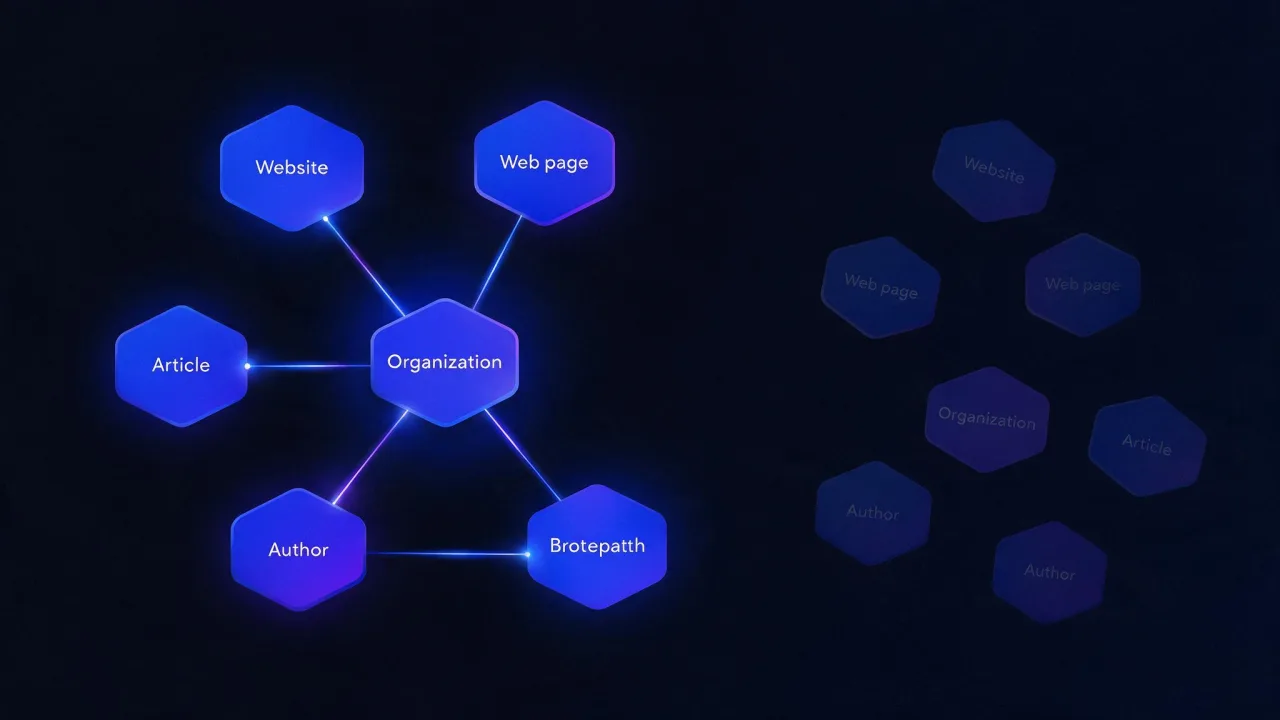
@id is a stable identifier for a node in the graph. A node without @id is anonymous: a parser cannot tell that the author of this article and the person on the "about the author" page are the same human, or that the publisher here and the publisher on the next page are one organization.
Three consequences of skipping @id:
- Duplicate entities. Every page mints a fresh "organization" with the same name. Instead of one strong node you get a hundred weak ones with no relation between them.
- No reuse. The publisher is redescribed inside every block, and the fields drift apart over time: an old logo here, a differently punctuated name there.
- Broken brand consolidation. Without a shared
@idandsameAs, a machine has no basis for treating scattered mentions as one entity.
The correct shape is a single JSON-LD block per page with a @graph container, where nodes reference each other by @id:
{
  "@context": "https://schema.org",
  "@graph": [
    {
      "@type": "Organization",
      "@id": "https://example.com/#organization",
      "name": "Example",
      "url": "https://example.com/",
      "logo": {
        "@type": "ImageObject",
        "@id": "https://example.com/#logo",
        "url": "https://example.com/logo.png",
        "width": 512,
        "height": 512
      },
      "sameAs": [
        "https://www.wikidata.org/wiki/Q00000000"
      ]
    },
    {
      "@type": "WebSite",
      "@id": "https://example.com/#website",
      "url": "https://example.com/",
      "name": "Example",
      "publisher": { "@id": "https://example.com/#organization" },
      "inLanguage": "en-US"
    },
    {
      "@type": "WebPage",
      "@id": "https://example.com/guide/schema/#webpage",
      "url": "https://example.com/guide/schema/",
      "name": "Structured data for AI search",
      "isPartOf": { "@id": "https://example.com/#website" },
      "breadcrumb": { "@id": "https://example.com/guide/schema/#breadcrumb" },
      "datePublished": "2026-03-04T09:00:00+00:00",
      "dateModified": "2026-08-11T14:20:00+00:00"
    },
    {
      "@type": "TechArticle",
      "@id": "https://example.com/guide/schema/#article",
      "headline": "Structured data for AI search",
      "description": "Which Schema.org types affect extractability.",
      "datePublished": "2026-03-04T09:00:00+00:00",
      "dateModified": "2026-08-11T14:20:00+00:00",
      "author": { "@id": "https://example.com/team/jdoe/#person" },
      "publisher": { "@id": "https://example.com/#organization" },
      "mainEntityOfPage": { "@id": "https://example.com/guide/schema/#webpage" },
      "proficiencyLevel": "Expert",
      "inLanguage": "en-US"
    },
    {
      "@type": "Person",
      "@id": "https://example.com/team/jdoe/#person",
      "name": "Jane Doe",
      "url": "https://example.com/team/jdoe/",
      "jobTitle": "SRE",
      "worksFor": { "@id": "https://example.com/#organization" }
    },
    {
      "@type": "BreadcrumbList",
      "@id": "https://example.com/guide/schema/#breadcrumb",
      "itemListElement": [
        { "@type": "ListItem", "position": 1, "name": "Home",
          "item": "https://example.com/" },
        { "@type": "ListItem", "position": 2, "name": "Guides",
          "item": "https://example.com/guide/" },
        { "@type": "ListItem", "position": 3, "name": "Structured data for AI search" }
      ]
    }
  ]
}
Conventions worth fixing in your team once and never revisiting:
@idis an absolute URL with a fragment:#organization,#website,#webpage,#article,#person,#breadcrumb. The fragment keeps it unique and human-readable at the same time.- The organization identifier is one per site and never changes. Changing that
@idis equivalent to announcing a new brand. - A repeat reference to a node is just
{ "@id": "..." }with no field duplication. - One block with
@graphbeats six independent blocks: relations inside a single block are explicit, relations across blocks are not.
What a broken graph looks like: a real case
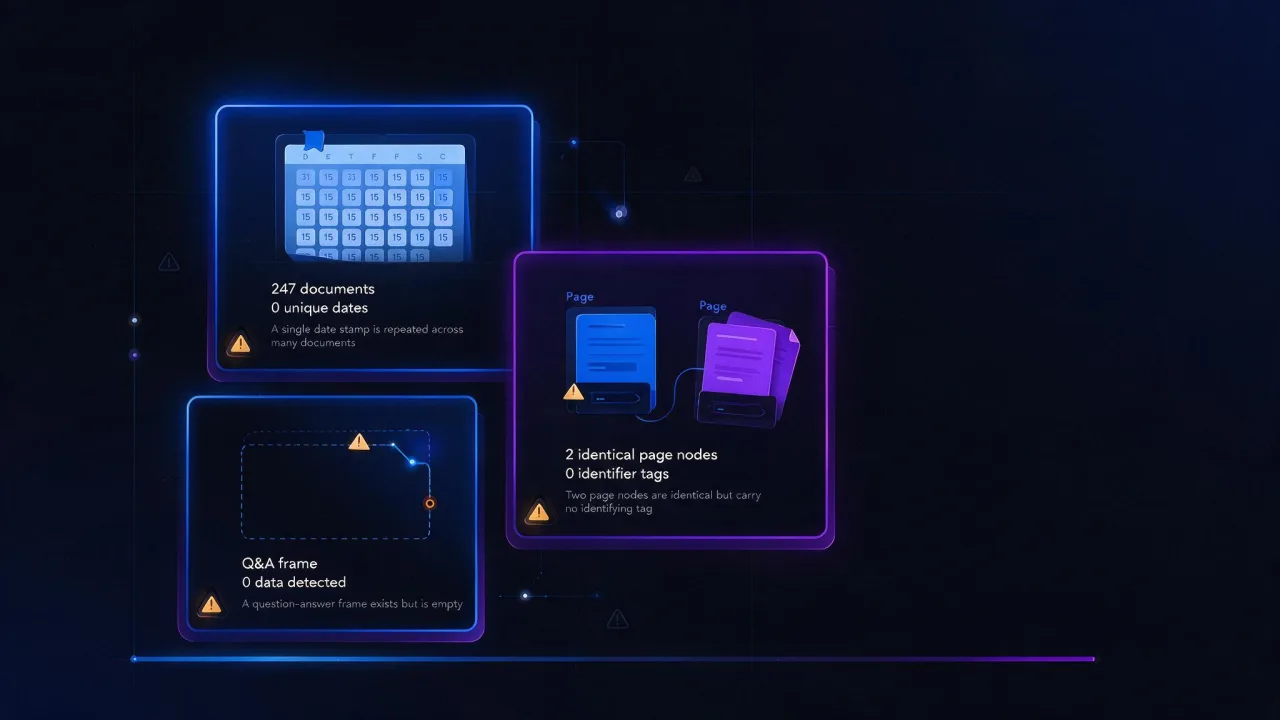
On one project we reviewed, a catalogue page carried two CollectionPage nodes. They were emitted by two different parts of the template — a shared layout and a section block. The names differed, and neither node had an @id:
[
  {
    "@context": "https://schema.org",
    "@type": "CollectionPage",
    "name": "Tools",
    "url": "https://example.com/tools/"
  },
  {
    "@context": "https://schema.org",
    "@type": "CollectionPage",
    "name": "All website checks — the full tool catalogue",
    "url": "https://example.com/tools/"
  }
]
Formally this is not an error, and a validator waves it through in green. In practice a parser receives two entities with the same URL and different names, and has to choose which description is the real one. Neither variant is reinforced — they compete with each other. The fix is dull: collapse to a single node with an @id, and take the name from the same source that renders the visible H1.
A second case from the same family: every blog article was typed as Article. That is valid and safe, which is exactly why it survives for years. But Article is the most featureless choice available — it does not distinguish a step-by-step procedure from an opinion piece or a reference note. After the type detection was rewritten — guides to TechArticle, procedures to HowTo, commentary to BlogPosting — the data finally carried a genre distinction that had simply not existed before.
A validator does not catch semantic errors. Two nodes without @id, a featureless type, a modification date taken from build time — all of it passes green and all of it degrades your data.
Common markup errors: symptom, cause, check, fix
| Symptom | Cause | How to check | Fix |
|---|---|---|---|
| Validator is green, effect is zero | Markup is not backed by visible text | Compare headline with H1, fields with page content | Drive both from one data source in the template |
| Two entities for one page | Several blocks with no @id from different template parts | Dump all nodes with the command in the next section | One block with @graph, an @id on every node |
| FAQ markup does nothing | FAQPage on a page with no visible FAQ | Search the page HTML for the question text | Either remove the markup or add a real block |
dateModified is always today | The date comes from build or request time | Compare with the Last-Modified header and edit history | Emit the date of the actual text change |
| The whole block is ignored | Invalid JSON: trailing comma, smart quotes from a visual editor | Run it through a parser (see the CI gate below) | Never edit JSON-LD in a WYSIWYG field |
| Author is not recognised | "author": "Jane Doe" as a string instead of a node | Check the value type of the field | A Person node with @id and url |
| Validator sees zero nodes | Markup is injected by client-side JavaScript | Compare raw HTML from curl with the browser DOM | Render the markup server-side |
| Brand reads as several different ones | Different organization @id per page, no sameAs | Compare the organization @id across three or four pages | One @id and one sameAs set for the whole site |
| Markup vanished after a release | The template was reissued without the block and nobody noticed | A check in CI on every deploy | A gate that fails the build on an empty graph |
How to validate: commands and validators
Start with what the server actually returns, not with what the browser shows. The gap between the two is the single most common reason behind "the markup is there, but nobody sees it".
Dump every node on a page with its type and identifier:
curl -sSL -A 'Mozilla/5.0 (compatible; audit/1.0)' https://example.com/guide/schema/ \
  | python3 -c '
import sys, re, json
html = sys.stdin.read()
pat = r"<script[^>]*application/ld\+json[^>]*>(.*?)</script>"
blocks = re.findall(pat, html, re.S | re.I)
print("blocks:", len(blocks))
for i, b in enumerate(blocks, 1):
    try:
        data = json.loads(b)
    except json.JSONDecodeError as e:
        print(i, "BROKEN JSON:", e)
        continue
    nodes = data.get("@graph", [data]) if isinstance(data, dict) else data
    for n in nodes:
        print(i, n.get("@type"), "|", n.get("@id") or "NO @id")
'
If you get blocks: 0 while the browser clearly shows markup, JavaScript is drawing it. For any bot that does not execute scripts, that markup does not exist.
Cross-check the heading and the dates between markup, visible text, and response headers:
# the visible H1
curl -sSL "$URL" | tr -d '\n' | grep -o '<h1[^>]*>[^<]*' | sed 's/.*>//'

# headline straight from the markup
curl -sSL "$URL" | python3 -c '
import sys, re, json
html = sys.stdin.read()
for b in re.findall(r"ld\+json[^>]*>(.*?)</script", html, re.S):
    d = json.loads(b)
    for n in (d.get("@graph", [d]) if isinstance(d, dict) else d):
        if "headline" in n:
            print(n["headline"], "|", n.get("dateModified"))
'

# what the server itself claims about freshness
curl -sSI "$URL" | grep -i '^last-modified'
And a CI gate that fails the build when a page ships broken JSON or nodes without identifiers:
curl -sSL "$URL" | python3 -c '
import sys, re, json
html = sys.stdin.read()
bad = 0
found = 0
for b in re.findall(r"ld\+json[^>]*>(.*?)</script", html, re.S):
    try:
        d = json.loads(b)
    except Exception as e:
        print("BROKEN JSON:", e)
        bad += 1
        continue
    for n in (d.get("@graph", [d]) if isinstance(d, dict) else d):
        found += 1
        if "@id" not in n:
            print("NO @id:", n.get("@type"))
            bad += 1
if found == 0:
    print("NO STRUCTURED DATA AT ALL")
    bad += 1
sys.exit(1 if bad else 0)
' && echo "schema OK"
Two external tools are worth keeping in the loop: the Schema.org validator, which checks conformance to the vocabulary itself without any search-engine opinion attached, and Google's rich results test, which reports only on features Google supports. The first is stricter about the vocabulary, the second about specific snippet requirements. They do not replace each other, and a green result in one says nothing about the other.
How to check it with enterno.io
- Schema.org markup checker — pulls every JSON-LD block off the page and shows types, identifiers and syntax errors exactly as a parser would see them.
- AI readiness check — evaluates the page end to end: bot access, structure, markup, presence of a content map.
- SEO audit — headings, a single
H1, canonical URLs, meta descriptions. - HTTP header check —
Last-Modified, caching, redirects. If the page answers with an unexpected status, the markup reaches nobody. - robots.txt checker — confirm the page is open to bots at all.
- Monitoring — so that markup disappearing after a release surfaces immediately, not a month later in a report.
What markup does not do
The list is short, and it is worth reading before you budget the work:
- It does not raise rankings. Structured data is not a ranking factor. It changes presentation and comprehension, not the weight of a document.
- It does not guarantee a rich result. Showing enhanced results is a search engine's decision, not a consequence of well-formed JSON-LD.
- It does not replace text. If a fact is missing from the page, it is missing for every consumer that drops
scriptcontent. - It does not protect content. Neither from copying nor from use in model training — that belongs to robots.txt and server-side rules.
- It does not fix inaccessibility. A page blocked in robots.txt, a 403 served to a bot, or markup drawn by client-side JS all reduce the work to zero.
- It does not buy "a slot in AI results". No such slot exists: the answer is assembled from scratch for every query.
If the task is phrased as "add markup so we appear in AI answers", the task is phrased wrong. The correct phrasing is "make the page unambiguous to a machine, and make sure the machine can reach it".

Pre-deploy checklist
- Markup is JSON-LD, served by the server in the raw HTML, not drawn by a script.
- One block per page, with a
@graphinside. - Every node has an
@id; the organization identifier is identical across all pages. - The primary type matches the genre of the page instead of being the default fallback.
headlinematches the visibleH1; the description does not contradict the opening paragraph.datePublishedanddateModifiedare real ISO 8601 dates, not build timestamps.authorandpublisherare nodes, not strings, and the author has a page on the site.- Every field is backed by visible content: no FAQ markup without an FAQ, no rating without reviews, no steps without steps.
- The JSON is valid, and the check runs in CI and fails the build.
- The page is open to bots and returns 200 without JS rendering.
FAQ
Is markup required to appear in an AI answer?
No. Assistants cite pages with no markup at all — clean text and sane headings are enough. Markup raises the chance that you are understood correctly: genre, author, date, brand ownership. It is about the quality of comprehension, not about admission.
JSON-LD, microdata, or RDFa?
JSON-LD. It is decoupled from the layout, so it survives redesigns, it validates easily, and it reuses nodes through @id. Microdata clings to specific tags and dies at the first template rewrite. RDFa is rare on ordinary sites and less well supported.
How many markup blocks can a page have?
Technically any number — parsers collect them together. Practically, one block with @graph is more reliable: relations between nodes inside one block are explicit, while several blocks emitted from different template parts are a direct route to duplicates without @id.
Is FAQPage still worth it if rich results barely show up?
Yes, if the FAQ genuinely exists on the page. Question-answer pairs remain the most quotable format regardless of whether a search engine draws a snippet. If there is no FAQ, the markup must not be there.
What goes into dateModified?
The date the text actually changed. A date that shifts on every rebuild destroys the signal: if "updated today" is true for every page on the site, it no longer separates updated material from untouched material.
Does sameAs help?
It is the one cheap way to say explicitly that the brand on your site and a profile elsewhere are the same entity. The links in sameAs must point to pages you genuinely own and that can be verified back to you; an arbitrary list of links is not a signal.
Does markup injected by a script count?
Only for consumers that execute JavaScript. Search robots do it with deferred rendering; most AI crawlers do not. Treat client-side markup as non-existent and you will be right more often than wrong.
Where to go next: structured data and SEO for classic search and rich results; how to check your markup for a step-by-step audit; robots.txt and AI bots for crawler access; llms.txt for a content map; the AI readiness checklist and GEO for the strategic layer.